
In the previous post, I shared a guide on how to create a front page, register multiple widgets and display them on your front page.
While that’s still useful, there is a better, smarter and simpler approach to get it done, thanks to Sridhar Katakam.
So, let’s jump in!
Simple Way to Register Multiple Widget Areas
Let’s say you want to register two widget areas on your front page.
Standard Approach:
https://gist.github.com/topleague/47cc709a61e71d17d446bcff99fe8611
https://gist.github.com/topleague/73ca2a67350f4cf3a6c470bc121623f4
Here’s the simpler and smarter approach that helps you write less code but still gets things done.
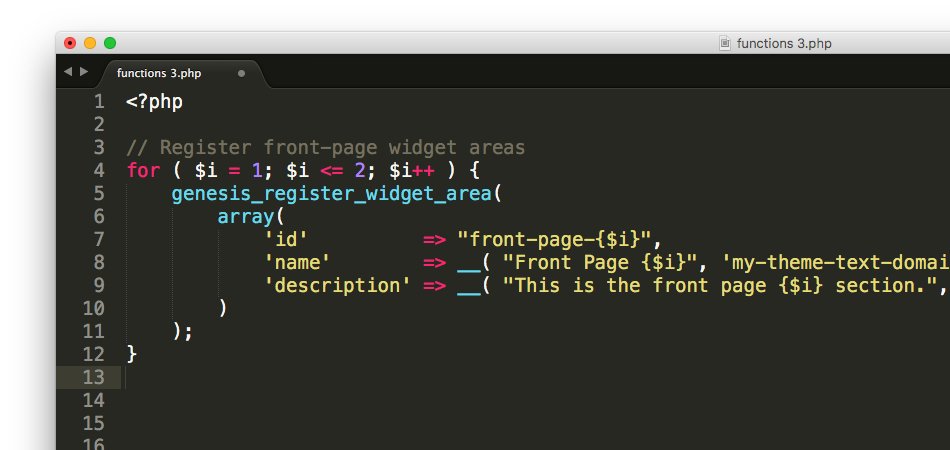
Add the following code to your functions.php file
https://gist.github.com/topleague/3e0e829b7e7f88894b715c0cd895786c
Explanation: Essentially, we are using a for loop and incorporating an ‘incremental php operator’, i.e, $i++ to generate a specified number of widget areas without repeating the step over and over again. Therefore, just change the digit, i.e, 2 in the above code to generate as many widget areas as you want.
You can read more about how php operators work here.
Simple Way to Display Multiple Widget Areas
Considering the above scenarios, let’s say we want to display the above two widget areas on our front page.
Standard Approach:
https://gist.github.com/topleague/cc7805e3303984403f77c04250a03030
https://gist.github.com/topleague/e53debbbfdacab42164aec14fd486a32
Here’s the simpler approach:
Add the following code to your front-page.php file
https://gist.github.com/topleague/8c734362e19301c40ee6ec7311dc9e2c
As you an see, we’re using a comparison operator, i.e, <= which essentially means “Less than of equal to”. What if you want to manipulate the above code to register widget areas differently? Choose from these PHP Comparison Operators.
Note: While using this method, always be sure to double check the code for accuracy. Otherwise, it won’t work.